ENFR
See the add-ins
Excel add-ins · no subscription

Automatisation Excel :
Vos dossiers, plannings & documents générés en un clic

You already know Excel. Our add-ins give it one more tab and a handful of buttons: what used to take twenty minutes by hand now takes a single click. Nothing to install, no account to create, your data stays with you.

See the add-ins DossiersLocaux (19 €) Gantt interactif JEV IA (Démo offerte)
✅ Lifetime licence, never a subscription 🔓 Open VBA source and editable 💳 Refunded for 30 days
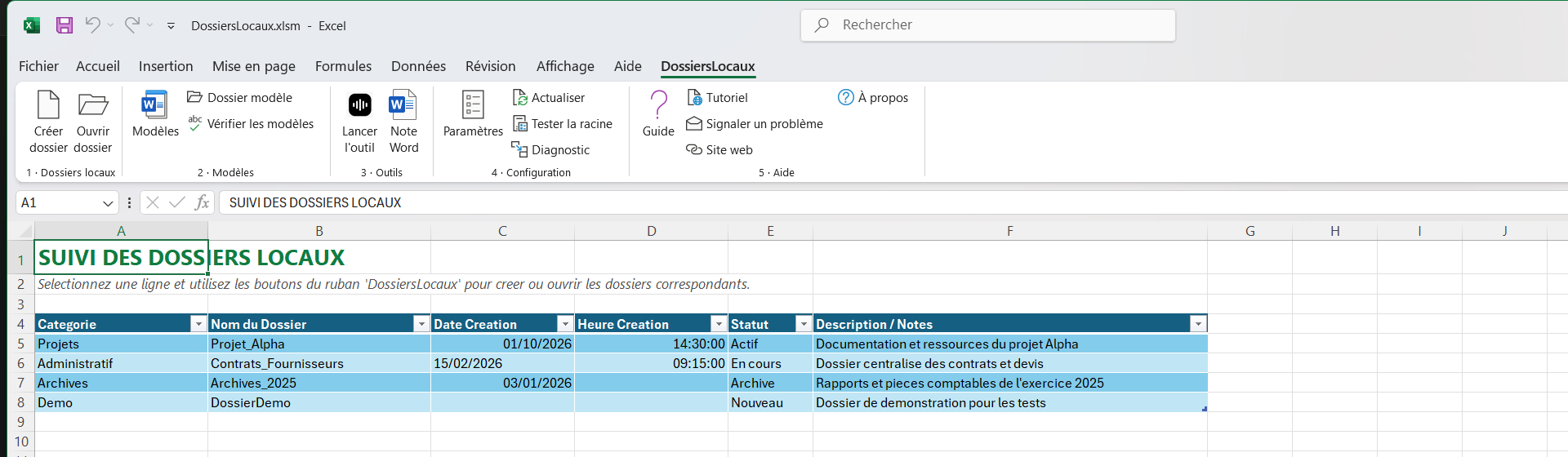
Onglet DossiersLocaux ajouté au ruban d'Excel : boutons Créer le dossier, Ouvrir, Documents, Sauvegarde et Paramètres.
L'onglet ajouté dans votre ruban Excel : tout part de là.
⚡ Avant-première · Réforme Facturation Électronique 2026

eFacture : Le module Factur-X officiel in Excel

La réforme arrive : bientôt toutes les entreprises devront recevoir et émettre leurs factures au format électronique légal. Oubliez les abonnements SaaS à 50 €/mois : eFacture génère vos factures Factur-X (CII EN 16931), valide les SIRET via l'API de l'État et dépose sur les plateformes partenaires (PDP), directement depuis Excel.

📑 Factur-X + PDF haute qualité 🏢 API Recherche d'Entreprises (SIRET en 1 clic) 🔐 Journal d'audit SHA-256 infalsifiable 💳 Lifetime licence sans abonnement
Tarif exclusif liste d'attente
29 € 49 € · licence à vie
🔒 Tarif de 29 € garanti à vie pour les inscrits (au lieu de 49 €)

Nos modules pour save time

Des modules prêts à l'emploi (DossiersLocaux, Gantt, JEV IA et bientôt eFacture), et un développement sur mesure si votre besoin est particulier.

Version 2.0 📁

DossiersLocaux

The “folders, documents & tools” ribbon

One row of your spreadsheet = a whole folder tree created on your disk, with your standard documents already filled in with the client's name.

  • Creates or completes your folders without overwriting anything
  • New: your Word, Excel or text templates, filled in on their own
  • New: the template changed? your documents update themselves as tracked changes
  • Up to 7 trade tools wired into the ribbon
  • 5 min of phone support included
39€19€ incl. VAT · lifetime
Explore the add-in See the detailed tutorial
New 📊

Gantt Excel

The “schedule” ribbon

A schedule you grab with the mouse: stretch a task, and everything that depends on it re-plans itself.

  • Drag the edge of a bar: the duration changes
  • Weekends, public holidays and leave skipped automatically
  • Critical path, float, milestones, work packages
  • Playable demo in your browser
39€19€ incl. VAT · lifetime
Try the demo See the price
⚡ Nouveau · IA 🤖

JEV

Ruban « Intelligence Artificielle & Décision »

Catégorisez vos factures, qualifiez vos prospects, routez vos tickets clients et enrichissez vos tableaux grâce à l'IA directement dans Excel.

  • 1 000 requêtes de démo offertes dès l'ouverture
  • Prompt ultra-souple : colonne, cellule ou gabarit dynamique
  • Lit automatiquement les menus déroulants natifs Excel
  • Score de confiance (% certitude) calculé pour chaque ligne
  • Crédits valables à vie, sans aucun abonnement mensuel
Free 1 000 req. · packs dès 4,90€
Découvrir le module JEV Télécharger la démo
Bientôt disponible 🧾

eFacture

Ruban « Factur-X & dématérialisation »

Préparez la réforme 2026 sans quitter Excel. Factures Factur-X conformes, contrôle SIRET en 1 clic et dépôt sécurisé, sans abonnement mensuel.

  • Format officiel Factur-X / CII EN 16931 + PDF haute qualité
  • Validation SIRET & TVA en 1 clic via l'API officielle de l'État
  • Connecteur PDP (Plateformes Partenaires) & suivi des statuts
  • Journal d'audit infalsifiable à hachage cryptographique SHA-256
  • Tarif lancement 29 € (au lieu de 49 € à la sortie), sans abonnement
29 € 49 € TTC · lancement (puis 49 €)
Réserver mon tarif à 29 € Voir les astuces Factur-X
On quotation 🛠️

Custom ribbon

Bespoke development

Your need fits no box? Describe the operation you keep repeating, and we turn it into a button.

  • Free quotation within 48 h, scope in writing
  • Developed and tested on your real data
  • Source code commented throughout, and it is yours
  • 30 days of corrections after delivery
from €500 incl. VAT · on quotation
Describe my need See examples

Which one is for you ?

Tous nos modules fonctionnent ensemble : rien n'empêche d'en combiner plusieurs.

You want to…DossiersLocauxGantt ExcelJEV (IA)eFactureCustom work
Create folders in bulk✓ that is its job———✓
Plan tasks and deadlines—✓ that is its job——✓
Classifier, catégoriser & enrichir par l'IA——✓ that is its job—✓
Émettre des factures Factur-X conformes 2026———✓ that is its job✓
Valider SIRET & TVA via l'API de l'État———✓ en 1 clic✓
Launch your software from Excel✓ up to 7 tools———✓
Automate a rule specific to your trade——✓ prompts sur mesure—✓
Be up and running today✓ delivered by e-mail✓ delivered by e-mail✓ 1 000 requêtes offertesBientôt (Q4 2026)1 to 3 weeks
Budget€19 once€19 onceDémo offerte · dès 4,90 €29 € en lancement (puis 49 €)from €500

The same principle everywhere

What does not change, whichever add-in you choose.

🏠

Your data stays with you

Everything runs on your own machine. No server, no account, no data going anywhere else. Your files never leave your disk.

🚫

No subscription

You pay once, and the add-in is yours for life. No licence to renew, no price rise the following year.

🔓

The code is yours

The VBA is open and commented throughout. You can adapt it, or have someone else adapt it: you are nobody's prisoner.

🎓

Nothing new to learn

It is Excel, with one more tab. Your teams see plain buttons — no training required.

🪟

Windows + Excel 2016 or later

Better said up front: the add-ins require Excel on Windows. On a Mac or in the browser, macros do not run.

💳

Refunded for 30 days

No justification to provide. One e-mail is enough, and you are refunded in full.

What people actually do with it

The add-ins know nothing about your trade: they apply your naming rules, your folder trees and your document templates. Here is how six lines of work use them.

🏗️

Design offices and project management

One project folder per spreadsheet row: written documents, drawings, meeting notes, each in its own subfolder and named to your convention. The site schedule lives in the same workbook, in working days, with the team's leave taken out.

See folder creation →
📐

Accountancy firms and professional practices

A complete client folder opened in one click, with the engagement letter and the certificate already in the client's name. When your letter template changes, existing folders are brought up to date as Word tracked changes : you review before accepting.

The most asked questions →
🔧

Tradespeople and small building firms

Quotes, photos, invoices: one folder per job, created from the row of your Excel tracker, without ever renaming a folder by hand. No management software to buy, no monthly subscription.

Discover DossiersLocaux →
🎬

Film production and events

The shoot's folder tree — rushes, edit, deliverables — is laid down in one click for each project, and the crew schedule is handled with the mouse instead of by copying coloured cells.

Try the Gantt schedule →
🏢

Property management and building agents

One folder per unit, leases and condition reports pre-filled, and your trade software opened on the right file from a ribbon button: up to seven external tools wired to the current row.

Wire a tool into the ribbon →
🧪

Engineering, quality and testing

Your business rules become buttons: consistency checks on a sheet, a call to an API, running a Python script, generating the final report in the format the client expects.

See the custom ribbon →

Frequently asked questions

The ones that come up before buying. Questions specific to each add-in are handled on its own page: DossiersLocaux, Gantt Excel, JEV (IA) and custom ribbon.

Do I need to know how to program to use these add-ins?

No. You open the workbook, you enable macros, a tab appears in the Excel ribbon: everything happens through buttons. The VBA source is shipped open for those who want to adapt it, but nothing obliges you to open it.

Does it work with Excel 365?

Yes, on the installed version of Excel 365 for Windows, just as on Excel 2016, 2019, 2021 and 2024. Neither Excel for the web nor Excel for Mac will run these add-ins, however: macros and custom ribbons are unavailable or incomplete there.

Is my data sent to a server?

Never. Everything runs on your own machine, inside Excel. There is no account to create, no database, no synchronisation. An add-in works on a computer that is entirely disconnected from the internet.

How is this different from a VBA macro found on a forum?

Scope and safeguards. An add-in checks its environment before writing, shows the exact path before creating anything, backs up whatever it modifies and never deletes an existing file. It is also commented from end to end, and shipped with five minutes of phone support for the initial setup.

Can I install it on several machines in my company?

The €19 price covers one user. To equip a team, write to us at contact@outilsexcel.fr: we issue a multi-seat licence, usually well below the unit price multiplied by the number of seats.

How is the add-in delivered?

By e-mail, immediately after payment: an archive containing the workbook, the template documents folder and the manual as a PDF. Payment goes through Stripe, which issues the invoice. If the add-in does not suit you, a refund is yours for the asking for 30 days.