ENFR
See the add-ins
Excel automation · one-time payment

Excel's repetitive tasks, done in one click

We sell ready-to-use Excel files. You open the file: a new tab appears at the top of Excel, and its buttons do the work for you: create your client folders, keep a schedule, sort your data with AI.

Find the add-in I need See a real example ↓
💳 Paid once, yours forever 🪟 Excel on Windows (2016 or later) ↩️ Refunded within 30 days
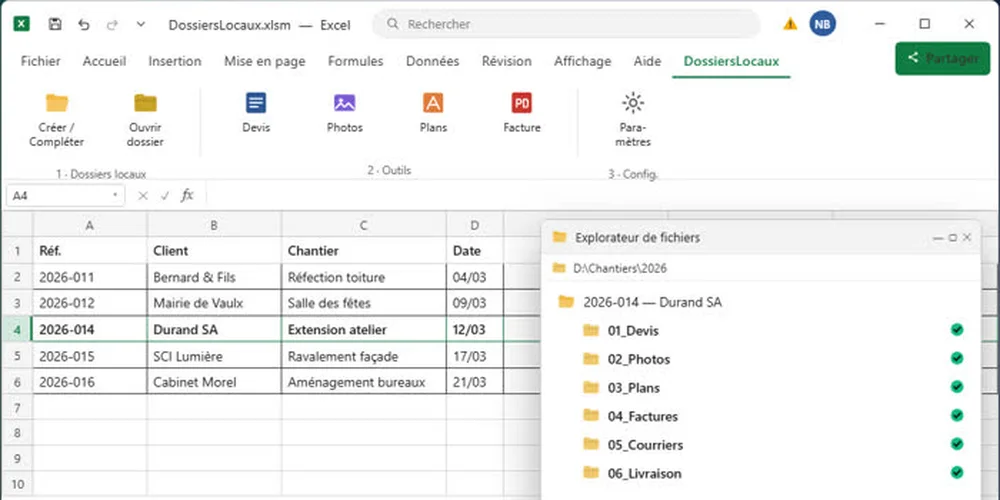
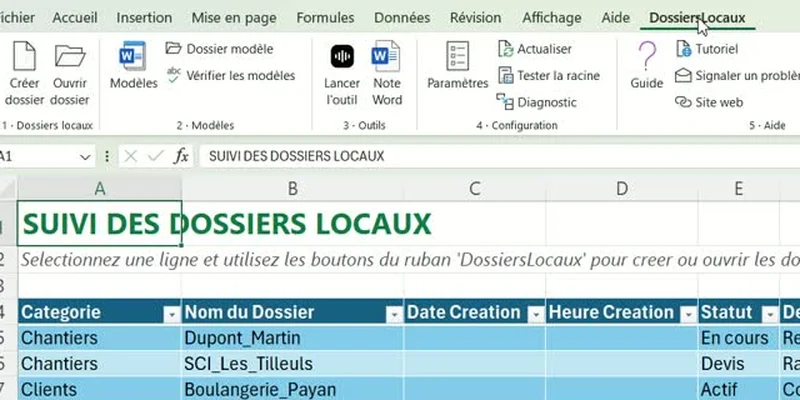
Excel table listing clients, with the Local Folders tab open in the ribbon.

1. You type a rowA client, a job, a project… in an ordinary Excel table.

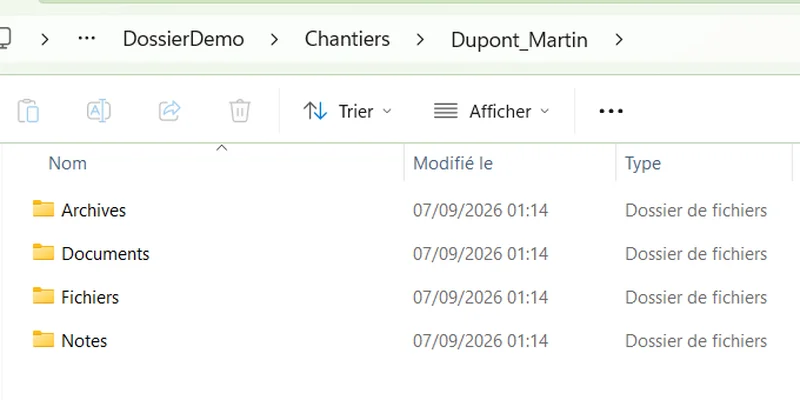
Windows Explorer showing the Dupont_Martin folder and its sub-folders Archives, Documents, Fichiers and Notes.

2. One click: the folder is createdWith all its sub-folders, organised and named the way you want.

Word document “Site visit report” already filled in with the client's name, category and subject.

3. The documents are already filled inQuote, letter, report: in the client's name, no copy-pasting.

Real example with the Local Folders add-in. What took twenty minutes by hand takes one click.

What do you want to stop doing by hand ?

Pick your need. Each add-in is a standalone Excel file, delivered by e-mail right after payment.

A job list in Excel and, next to it, the job folder created automatically with its sub-folders Quotes, Photos, Plans, Invoices.
Version 2.0Add-in Local Folders

Create your client folders and their documents

A row in your table becomes a complete folder on your computer, with your template documents already filled in.

  • Your sub-folders created and named by your rules
  • Your Word and Excel templates filled in with the client's name
  • Never deletes or overwrites anything
€39€19incl. VAT · one-time payment
See how it works
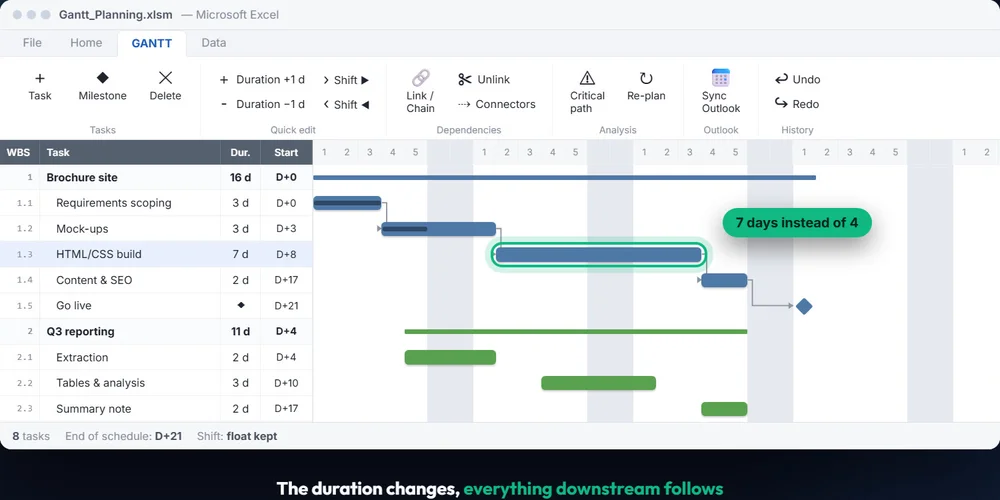
Gantt schedule in Excel: a task stretched from 4 to 7 days, the following tasks shift on their own.
Free online trialAdd-in Gantt

Keep a project schedule that re-plans itself

A task is running late? Stretch its bar with the mouse: everything after it shifts automatically.

  • Weekends, public holidays and leave taken into account
  • You see straight away which tasks delay the finish
  • Try it in your browser before buying
€39€19incl. VAT · one-time payment
Try the schedule
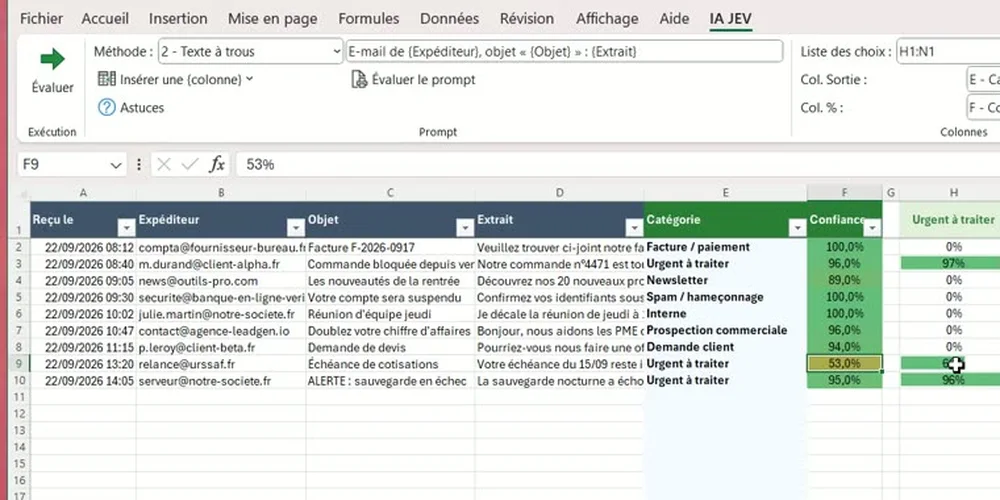
List of e-mails in Excel, each one automatically classified by AI (invoice, urgent, prospecting…) with a confidence percentage.
Free to tryAdd-in AI Data Classifier

Sort and classify hundreds of rows with AI

E-mails, invoices, customer reviews, leads: the AI reads every row of your table and files it in the right category.

  • You choose the categories, the AI fills in the column
  • A confidence percentage for every row
  • 1,000 rows free, no credit card
Freethen top-ups from €4.90
Get the free trial
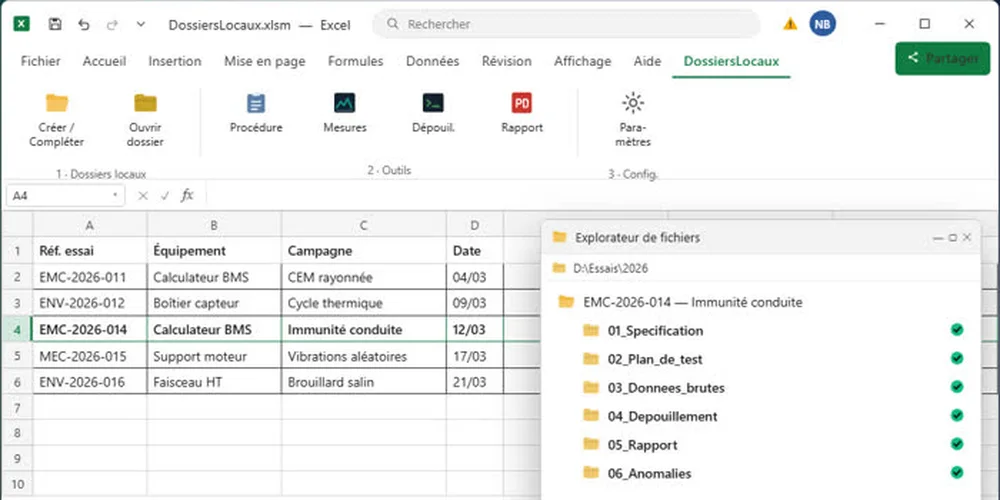
Excel tab built for a test laboratory, with Procedure, Measurements, Analysis and Report buttons.
On quotationCustom development

Automate a task specific to your trade

Your need isn't on the list? Describe the task you repeat every week: we turn it into a button.

  • Free quotation within 48 h
  • Tested on your real data before delivery
  • The code is yours, 30 days of fixes included
from €500incl. VAT · on quotation
Describe my need

How it works, in practice

No software to install, no account to create. If you can open an Excel file, you can use it.

You choose an add-in

You pay once, by card, via Stripe. No subscription, no renewal.

You receive it by e-mail

Within a minute: the Excel file, its template documents and a PDF manual.

You open it and click

A new tab appears in Excel's ribbon. Each button does one task, no training needed.

🪟 Good to know before buying: the add-ins work with Excel installed on a Windows PC (2016, 2019, 2021, 2024 or Microsoft 365). They do not work on Mac or in Excel for the web.

What applies to every add-in

The same commitments, whichever add-in you choose.

🏠

Your data stays with you

Your files never leave your computer. Only the AI Data Classifier sends the AI the rows to process.

🚫

No subscription

Paid once, usable for life. No price that goes up.

↩️

Refunded for 30 days

A simple e-mail is enough, no questions asked.

🎓

Nothing to learn

It's your usual Excel, with one extra tab and clear buttons.

📞

A real person to help

5 minutes of phone support to get you started.

🔓

Nothing hidden

The code is open and commented (in French): you can adapt it.

What do people use them for?

A few examples of businesses that save time every week.

🔧 Tradespeople and small builders

One folder per job — quotes, photos, invoices — created from the tracking table, without ever renaming a folder by hand.

Create my folders →

📐 Accountants and independent professionals

A new client's folder opened in one click, with the engagement letter already in their name.

Frequently asked questions →

🏗️ Design offices

One project folder per row, and the site schedule in the same workbook, in working days.

Try the schedule →

🛒 Retail and customer service

Hundreds of e-mails or customer reviews classified by AI in a few minutes, right inside Excel.

Try the AI for free →

🏢 Property management

One folder per unit, leases and inventories pre-filled, your software opened on the right file.

See the add-in →

🧪 Engineering and quality

Your recurring checks and reports turned into buttons, custom-built for your team.

Request a quote →

Not decided yet? Learn for free

Freely available content, no sign-up.

💡 98 Excel tips

Shortcuts, formulas and functions, sorted by topic.

📘 Step-by-step guides

Create folders with VBA, build a Gantt chart, fill a Word document from Excel…

🎬 Video tutorial

The Local Folders add-in explained from A to Z, with pictures.

Frequently asked questions

The ones we get asked before people buy.

What exactly do I receive?

An e-mail, right after payment, with an archive: the add-in's Excel file, its template documents and a PDF manual. Save it wherever you like and open it like any other Excel file. Stripe sends you the invoice.

Do I need to know how to code?

No. You open the file, allow macros when Excel asks, and a tab appears: everything is done with buttons. The code is supplied open for those who want to adapt it, but nothing forces you to open it.

Does it work with my version of Excel?

Yes, if Excel is installed on a Windows PC: Microsoft 365, 2016, 2019, 2021 or 2024. Not on Mac nor in Excel for the web: macros and custom tabs don't work there.

Is my data sent to a server?

Never for Local Folders and Gantt: everything runs on your computer, even offline. Only the AI Data Classifier add-in sends the AI service the text of the rows you ask it to process.

And if it does not suit me?

You get a full refund for 30 days, with a simple e-mail to contact@outilsexcel.fr, no questions asked.

Can I install it on several computers?

The listed price covers one user. To equip a team, write to us at contact@outilsexcel.fr: a multi-seat licence is drawn up, well below the unit price multiplied by the number of seats.
Save your next twenty minutes today

An add-in for €19, paid once, refunded if you're not convinced.

Choose my add-in